
Übersicht: FLV Player
22 Okt 2008
Hier eine Übersichtsliste mit aktuellen FLV Playern. Mit ihnen können Flashvideos (.flv, .f4v), also alle Flash-kompatiblen Videos, auf der eigenen Website eingebettet und abgespielt werden. Die meisten Player fallen unter eine Open Source Lizenz.
Des Weiteren gibt es am Ende noch einige Lösungen, um Flashvideos auch lokal abzuspielen.
Kuler Screensaver 2 – jetzt auch für Windows
16 Okt 2008
Genau dreizehn Monate nach der ersten Version des Kuler Screensaver gibt es eine neue Fassung. Adobe hat anlässlich der Creative Suite 4 die alte Kuler API heute deaktiviert. Diese Chance habe ich genutzt und freue mich, dass ich den Screensaver nun (neben OS X) auch für Windows bereitstellen kann.
 Microsoft hat mit Silverlight einen Flash/Flex-Rivalen mit durchaus ernstzunehmenden Ambitionen im Programm.
Grund genug, in diesem Beitrag einen Überblick zu geben, was Silverlight ist und alle wichtigen Fakten zu “Video in Silverlight” zusammenzufassen.
SWF Screensaver for Mac
8 Jul 2008
Create your own flash screensavers

SWF Screensaver for Mac is a Flash screensaver maker. You can easily create your mac screensavers with your own SWF files.
- Native Mac OS X screensaver (10.4 and 10.5)
- Use your own SWF files (Flash and Flex)
- Create a custom Flash preferences panel
- Dual screen support
- Different scale modes
- Flash Player version check
- Check if internet connection is available
(0.9.2)
License

This work is licensed under . The attribution is placed in the options panel of the screensaver. For noncommercial purposes, you can use the application for free.
If you want to use SWF Screensaver for Mac commercially, please donate 10€ (Paypal-Link). In this case, the attribution won’t be displayed.
Video: How to create a flash screensaver
Quick Start Guide
1. Right-click the screensaver application. Choose “Open Package Contents” in the context menu.

2. You can see several folders. The most important one is “Resources” because it contains the SWF files. Replace screensaver.swf with your screensaver SWF file and config.swf with your preferences SWF file.
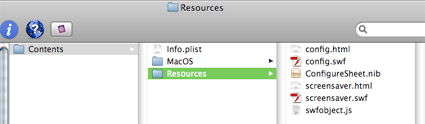
3. That’s it! Close the package and double-click the screensaver. Enjoy your new screensaver!
FAQ: Features
How does SWF Screensaver work?
SWF Screensaver for Mac is a native Mac OS X screensaver built with XCode. Just copy your own SWF file into the package!
Can I save preferences?
Yes, you can realise preferences by using shared objects which are kind of flash cookies. The swf file in the config panel saves a value that can be read by your screensaver swf file. You can find an example in the download.
Are dual screens supported?
Yes, the screensaver will be displayed on both screens.
What happens if the user doesn’t have flash player installed (or just an old version)?
You can define and design a custom message.
How to install the screensaver?
The user just has to double click the screensaver … it’s a Mac 
(Mac OS X will automatically launch the system preferences and install the screensaver.)
Which flash player versions are supported?
You can target any flash player version because the screensaver uses the flash player currently installed in Safari (on the client system).
FAQ: Development
How can I change the scale mode?
Open the file “screensaver.html” and search for params.scale. You can choose between four scale modes: showall (default), noscale, noborder, exactfit.
Let’s imagine you are showing a 800×600 flash animation with a rectangle and a circle on a 16:10 display (1680×1050). The four scale modes would look like this:
showall:

noscale:

noborder:

exactfit:

How can I change the background color?
Open the file “screensaver.html” and search for params.bgcolor. Change the value of this parameter with a hex color code.
How can I change the “no flash player” message?
Open the file “screensaver.html” and search for div id="myContent". Replace the HTML code within this div with your own code. For testing purposes, you can alter the flash player version in the line swfobject.embedSWF to a higher number (e.g. 11.0.0) that doesn’t exist. So you can check the message.
What are the dimensions of the config panel?
400×)
( 500× and 0.9.1)
Can I use more than one SWF file?
Yes, you can use as many SWF files (or even other file types) as you need. Just copy them in the “Resource” folder (or create a subfolder in “Resource”).
Using offline files (Sandbox Security)
Please take care of flash player’s security model (). You can’t load local files and access the web at the same! Of course, you can fix this by changing the sandbox to “local trusted” in the Flash Player preferences. But if you deliver the screensaver the users will have to do this, too. So I think that isn’t good idea.
One way to avoid this: Include all the assets you need in your SWF file. So you don’t need local access. Or: Use the feature “online check”
Online check (0.9.1)
This features allows you to check if an internet connection is available. To activate this, open the info.plist and set CheckIfOnline to true. Then, write the servername in OnlineCheckServername that will be pinged. Important: Don’t start with http://, just write www.myserver.com.
If there’s an online connection, the file from the parameter ScreensaverFile will be loaded. If you are offline, it’s the file in ScreensaverFileOnlineCheckFailed.
To avoid the security sandbox problems (see above), set the publish settings (”File > Publish settings > Flash”) correctly in Flash. For the online swf file, it’s “network access”. For the offline one, it’s “local files”.
How can I log data from my flash screensaver?
Screensaver:
For the Mac OS X screensaver, open the info.plist and set the parameter DebugMode to true. Everytime, the screensaver runs, a log file called Log.txt will be written in the same directory where the info.plist is.
Flash:
You can use LogBook to log messages from your screensaver flash content to the AIR LogBook application. See here:
Status and open issues:
Open:
- If the flash content is “noscale”, the preview screen doesn’t look nice
Feedback
Post your feedback here.
Thanks to …
Release notes
0.9.2: Config panel is now 400×400 (same as Instantstorm)
0.9.1: New online check feature
0.9: Initial release
Old versions:

SWFObject ist ein Skript, das dazu dient, Flashdateien (.swf) in HTML-Seiten einzubetten. Das Skripte (JavaScript) ist sehr einfach zu nutzen und hat viele Vorteile wie Flash-Plugin-Erkennung, keinen Aktivierungsrahmen beim Internet Explorer, W3C-Validität oder Unterstützung der Express Installation.
Gestern wurde nach 14 Monaten der Nachfolger des populären SWFObject 1.5 veröffentlicht: SWFObject 2 (ehemals SWFFix). Grund genug, eine Blick darauf zuwerfen, wie es funktioniert.
Open Source MP3 Player
16 Feb 2008
Beim Testen der Open-Source-Komponenten von Yahoo! ist ein kleiner Flash MP3-Player entstanden, mit dem man MP3s in eine Website integrieren kann. Man benötigt kein Flash, da die MP3-Datei über den Code zum Einbetten angegeben wird.
Der Player so sieht so aus:

Der von Apple geprägte Coverflow-Effekt ist mittlerweile sehr populär. Im Folgenden ein knappes Dutzend Beispiele für Coverflow in Flash oder Flex. Größtenteils können die Quelldateien heruntergeladen werden.
Übersicht: PageFlip Tools
9 Jun 2007
Der sogenannte PageFlip-Effekt, also die Nachbildung des Umblätterns von Seiten, erfreut sich immer noch einer hohen Beliebheit. Ich habe im Folgenden eine kleine Übersicht über die gängigsten Möglichkeiten zusammengestellt. Falls jemand weitere Komponenten kennt, die unbedingt in die Liste sollten, kann er mir gern eine kurze Nachricht schicken.
Am Ball bleiben …

FFK09

Aktuelle Kommentare